Getting Started
PLA Not Sticking to the Bed? Read the First Layer Before Changing Settings
A round strand, a scraped patch and a lifting corner do not point to the same fix. Use a small test to separate surface, nozzle distance, profile and geometry.
By Hobby-ist Editorial Team · 5 min read · October 20, 2026
In this story
The printer starts, a loose curl follows the nozzle, and another model is heading for the bin. Before reaching for glue or changing five settings, watch the first line. A round strand that will not join its neighbor and a scraped, almost transparent patch tell different stories. A small test can help you read which one is yours.
This guide is for ordinary PLA on an FDM printer with a manufacturer-supported build surface. Keep your machine and plate instructions beside you as you work. The aim is to get useful evidence from one small first-layer test before committing another full model.
Separate “not attached” from “not extruded”
Watch the start from a safe position, keeping clear of the moving head and hot parts. If little or no plastic comes out, surface cleaning is not the whole explanation. Confirm that the intended filament is loaded and that your printer’s normal feed or purge procedure produces material. Follow its loading or clog procedure if it does not; do not keep lowering the nozzle to force a nonexistent line onto the bed.
If plastic does emerge but follows the nozzle around as a loose curl, stop the failed print before it grows into a blob. Let the machine reach the state required by its manual before cleaning or handling it. The useful evidence is the first line and where it failed, not a large nest of filament produced after the failure was already obvious.
Read a small patch, not just the outside outline
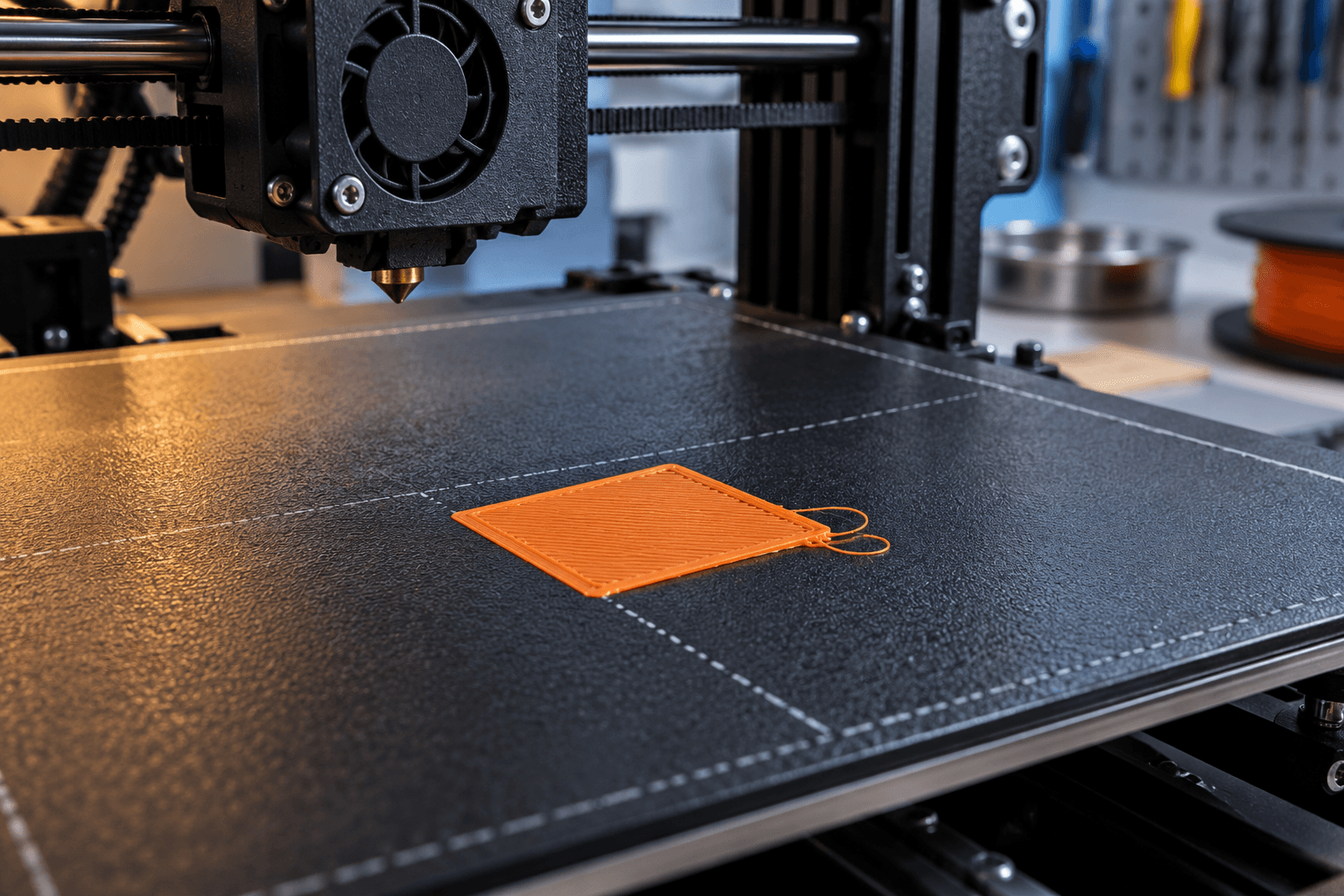
Use the printer’s own first-layer test if it has one. Otherwise, use a small flat calibration patch suited to your nozzle and material profile—for example, a roughly 20mm square sliced one initial layer tall. Inspect the slicer preview so you are testing the intended first layer rather than accidentally starting a multi-layer object. Place it near the center for the first comparison.
Rounded separated lines and gaps can indicate excessive nozzle-to-sheet distance. Very thin, scraped-looking areas or raised ridges can indicate that the nozzle is too close. A useful patch has neighboring lines joined into a fairly even surface without deep furrows. Prusa’s illustrated calibration guide shows these distinctions and also notes that a good-looking patch with poor adhesion can point elsewhere.
Use those shapes to choose the right calibration procedure for your machine. The linked manual Live-Z guide covers the listed older i3-family models; other probing and automatic contact systems use different steps. Follow your exact printer and nozzle setup. A stranger’s numeric Z value cannot tell you the distance on your own machine.
Identify the sheet before choosing the cleaner
Read the plate’s name or manual: smooth PEI, satin, textured and proprietary coatings can require different handling. Fingerprints matter because the next layer is trying to attach to the surface you touched. Handle a removable sheet by its edges after cleaning and make sure it sits correctly, without debris trapped beneath it.
Prusa’s first-layer guide describes high-strength isopropyl alcohol for its specified PEI sheets and occasional dish-soap cleaning when appropriate. Use the method approved for your exact surface, on a cooled surface as instructed, and let it dry. Cosmetic wipes or nail products may contain additives; do not substitute them just because the label mentions alcohol.
The sheet guide is important when switching surfaces. In particular, acetone is not a universal rescue and must not be used on Prusa satin or textured sheets. Likewise, an adhesive can serve as a separation layer for some material/surface combinations; “more adhesion” is not its only purpose. Do not import a PETG recipe into a PLA problem.
Return to a known material profile
Return to a known starting point: PLA in the machine, the correct nozzle size in the printer preset and the matching filament profile. It is easy to forget a setting left over from another job. Make the baseline clear before changing speed, flow, fan or temperature, so the next patch has something meaningful to compare with.
For context, Prusa’s PLA guide lists 215°C for the first layer, 210°C afterward and a 60°C bed. Use the values specified for your own printer and filament rather than adopting that example automatically. Once the appropriate profile is loaded, a clean, correctly seated sheet still matters; heat cannot do that job for you.
If the profile and surface are correct but the line is being dragged before it settles, compare a more conservative initial-layer speed using the printer or slicer’s documented controls. Change only that setting for the next patch. If extrusion remains thin or intermittent, move to the manufacturer’s extrusion diagnosis instead of repeatedly compensating with nozzle distance.
When the patch works but the model does not
A broad test square can succeed while a narrow-footed model fails. Compare the footprint in the slicer: are there tiny separate islands, sharp corners or a tall object supported by very little contact area? These are geometry questions. A different orientation or a brim can provide a better starting footprint, subject to the design’s needs.
Prusa’s skirt-and-brim guide distinguishes the two: a skirt surrounds the model without joining it, while a brim adds material attached around its base. A skirt is not an equivalent adhesion aid. Preview the brim and expect removal work afterward. If the whole first layer is failing immediately, fix that before using a large brim to disguise it.
Leave yourself a five-part note: sheet, filament profile, patch appearance, one change and the next result. For example: “Cleaned the sheet; same profile; the center patch now joins.” That is something you can use again. A page of simultaneous changes gives you much less help when the printer misbehaves next week.
For a manageable next model, our first cable-label design project keeps the object small enough to inspect. The first-printer operating checklist puts routine maintenance and setup into the larger hobby budget; a failed layer does not automatically mean you need another machine.
The useful result is more than a square that stays down. You have learned whether the trouble began with flow, contact, nozzle position, settings or the model’s footprint. The next time a curl follows the nozzle, you will have a place to start instead of another handful of guesses.
Sources & verification
Information checked: 2026-10-20